
Back in February, Discord first attempted to launch its age verification process—only to run straight into massive user outcry. In response, the company went back to the drawing board. Now, half a year later, the branding of teen and adult accounts has finally rolled out.
As a regular Discord user, I wasn’t sure what to expect from the process. So, while waiting my turn, I read up on what I needed to know.
You can’t opt out
Discord first framed age verification on the platform as a move to protect teens. Problem was, it expected users to submit to a facial scan or upload a government ID. That sparked protest—and rightfully so, given today’s greater privacy and security concerns.
Now Discord has easier methods to prove adulthood, if you somehow get flagged as a teen. But you can’t escape the classification process. Multiple countries have begun requiring companies to confirm the ages of users, in order to protect children from harmful content and exposure to unsafe adults.
The only true way to opt out is to leave the platform all together.
Verification is now less invasive
If you stick around, Discord automatically assigns you an age group based on what it calls “signals.” Using machine learning, the platform guesses your age based on details like how old your account is, who you speak with the most, the servers you belong to, and if you’ve ever subscribed to Nitro. Discord says it does not read your messages (either those sent on servers or over direct message) as part of its evaluation.
According to Discord, this method will accurately assign an age category to over 90 percent of users. If it doesn’t, adults can prove their age through credit card info, the Apple App Store or Google Play Store, Google Wallet, or AgeKey. (AgeKey is a service owned by Singaporean age verification company k-ID.)
Discord says its third-party vendors for age confirmation must abide by its data retention policies. Namely, any age verification related data can only be kept for the time needed to confirm age, then must be deleted after. If facial age estimation comes into play, it can only be performed on your device.
You can choose not to verify
Still don’t want Discord to have any further information about you in order to escape classification as a teen? You can still keep using the platform, but your access will be more locked down.
Teen accounts are restricted from age-gated servers, content, and settings. Messages with sensitive content may be blurred or all together blocked, depending on the source. Direct messages from non-friends will automatically be sent to a message request inbox, allowing you to screen them before they appear in your normal DM list. (For the full details on Teen protections, you can read Discord’s full rundown.)
Perhaps a small benefit: Discord is now enabling “spoiler channels,” which will let server owners sequester juicy info without having to age-lock them. (AKA the long-standing workaround.)
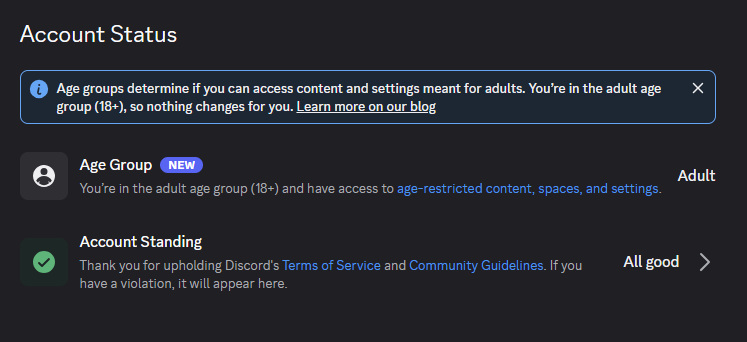
Where to check your status
PCWorld
Head to Settings > Account. Under Account Status, you’ll see “Age Group.” Your status will be listed as either Teen or Adult.
Anecdotally, users on PCWorld’s The Full Nerd Discord server have reported getting Adult status—and just before I filed this story, I received the same designation, too. So Discord may end up being right about its high estimates for accurately pinpointing “mature” behavior.
(We’re all still emotionally unsure it was correct, though.)
This articles is written by : Fady Askharoun Samy Askharoun
All Rights Reserved to Amznusa www.amznusa.com
Why Amznusa?
AMZNUSA is a dynamic website that focuses on three primary categories: Technology, e-commerce and cryptocurrency news. It provides users with the latest updates and insights into online retail trends and the rapidly evolving world of digital currencies, helping visitors stay informed about both markets.
