
Need to rearrange the pages in a PDF without uploading the file to an online service? PDF Arranger lets you do exactly that.
With multi-page PDF files, you may sometimes need to rearrange the pages. This isn’t possible with Acrobat Reader, and most other PDF viewers don’t support this either. The downside with using an online tool such as PDF24 is that you have no control over who can access your PDF.
A simple but effective local solution is the open-source software PDF Arranger. On GitHub, click on the version number under Releases to download the MSI file and install the program. Once you’ve opened the tool, click on the hamburger menu with the three horizontal lines, select Open, and navigate to your PDF document.
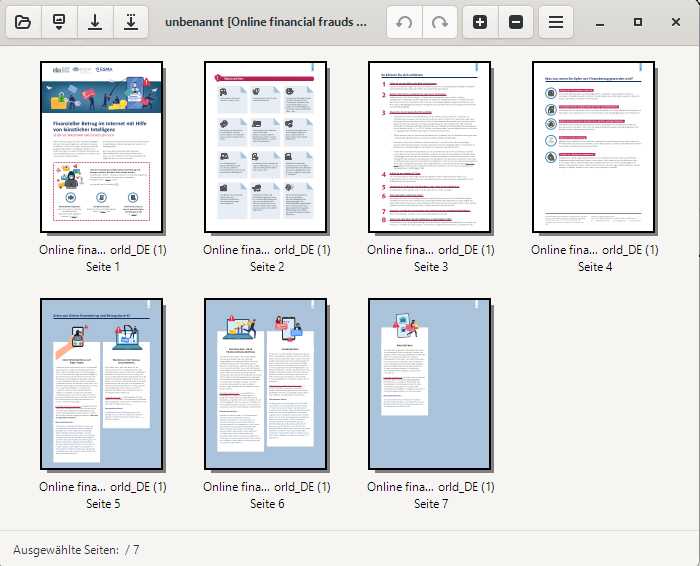
Foundry
Alternatively, you can simply drag the file from File Explorer into the program window. PDF Arranger will now display thumbnails of the individual pages. You can drag and drop them into the desired positions. Click Save in the hamburger menu to save the new order.
Because PDF Arranger runs locally, your PDF doesn’t need to be uploaded to an online service.
This articles is written by : Fady Askharoun Samy Askharoun
All Rights Reserved to Amznusa www.amznusa.com
Why Amznusa?
AMZNUSA is a dynamic website that focuses on three primary categories: Technology, e-commerce and cryptocurrency news. It provides users with the latest updates and insights into online retail trends and the rapidly evolving world of digital currencies, helping visitors stay informed about both markets.
