

At a glance
Expert’s Rating
Pros
- Excellent at detecting fully AI-generated text
- Very low false positives in testing
- Detailed, easy-to-read detection results
- Polished interface with useful file uploads and integrations
- Generous free tier and reasonably priced Individual plan
Cons
- Less reliable with heavily edited AI text
- Mixed human/AI content can be difficult to classify accurately
Our Verdict
Pangram is one of the strongest AI detectors I’ve tested, combining excellent accuracy on fully human- and AI-written text, with a polished interface and useful features. It becomes slightly less reliable once heavy human editing or mixed authorship enters the picture, but that’s a common weakness among AI detectors anyways. With detailed results, file uploads, plagiarism checking, API, and a solid free tier, Pangram is easy to recommend.
Price When Reviewed
This value will show the geolocated pricing text for product undefined
Best Pricing Today
Best Prices Today: Pangram
Founded in 2023, Pangram is a newer AI detector, but it has quickly become one of the most popular on the market. It makes some big claims. Pangram says its latest version, Pangram 4, can catch fully AI-generated text, writing that blends human and AI input, and even the trickiest of passages that received a light AI edit. Pangram reports a very low false-positive rate in its own tests—1 in 24,000 with the latest model. It also offers plagiarism checking, document uploads, and support for 24 languages.
That’s a strong pitch, but AI detection is notoriously messy in practice. So I ran Pangram through a gauntlet of tests to see how it fares with AI-generated text, human writing, blended and edited passages, and even a few tricks meant to throw it off.
Pangram in brief:
- Price: Free up to 2,000 words per day; Individual: $20/month; Professional: $65/month
- Supported languages: 24
- File uploads/formats: PDF, DOCX, and RTF; supports OCR for scanned documents
- API: Yes
- Plagiarism checker: Yes
- AI models it claims to detect: ChatGPT, Claude, Gemini, Llama, Grok, DeepSeek, Mistral, Qwen, Kimi, Gemma, Nemotron, and GLM
- Company: Pangram Labs, Inc., based in Brooklyn, New York
What features does Pangram offer?
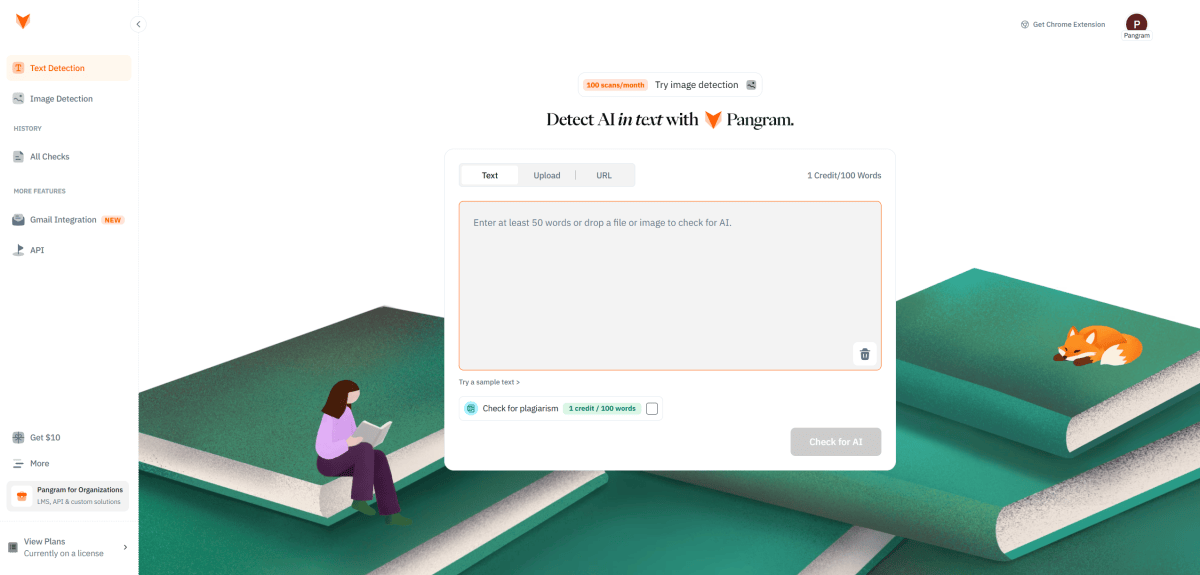
Pangram’s Dashboard is very clean and easy to use. Simply paste the text you want to check into the box in the middle and click “Check for AI.”
Sam Singleton
Pangram works differently from a lot of older AI detectors. Instead of relying heavily on perplexity—basically a measure of how predictable a piece of writing looks to an AI model—Pangram uses a classifier trained to spot patterns tied to human and AI writing. It then estimates whether the text was written by a person, generated by AI, or generated by AI with human edits.
Like most of these services, it gives you an AI detection score ranging from 0 (human written) to 100 (AI-generated). Longer documents get split into sections, and passages are highlighted based on how they’re classified. Pangram’s current model attempts to distinguish between human-written, AI-assisted, and fully AI-generated text within the same document.
Pangram’s level of detail is a big selling point. Unlike other AI-detectors that slap a single AI-or-not label on a whole document, Pangram gets into the nitty-gritty details, flagging specific sections it believes are AI-generated or not.
After analyzing a text, Pangram color-codes everything, making it easy to parse. Results are split into how much of a document or section looks like it was written by AI, and how confident it is in that call. I really like that the results are statistical rather than definitive. Instead of leading you to believe a text was definitely written by AI, Pangram’s results are meant more as guidance, encouraging you to read deeper.
The dashboard is super clean. There is a large text box in the center where you paste your text. A sidebar gives you options for Text Detection, Image Detection, History, Gmail Integration, and API. You can paste text directly into the dashboard or upload PDF, DOCX, and RTF files, including scanned documents via OCR. It supports batch uploads of up to 100 files, and it saves your past scans so you can reopen them or download reports later. There’s also an option to paste in a webpage URL and scan it directly.
Pangram also offers Chrome and Firefox extensions. These are really handy as they let you scan highlighted text right on a page. It also works with Google Docs and integrates with education platforms like Canvas, Moodle, Blackboard, and Google Classroom.
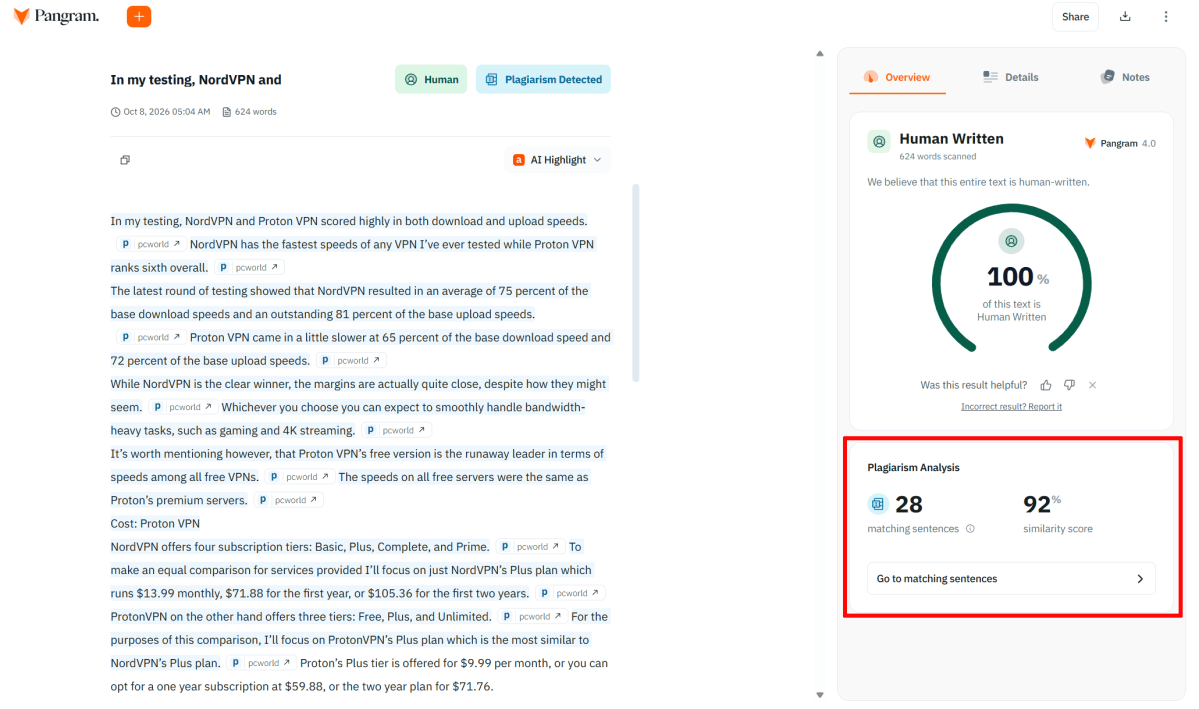
Pangram’s Plagiarism Check tool caught all instances of plagiarized content when I tested it. And just like the AI-detector, it shows sentences and lines that it believes have been plagiarized and even includes links to the source material.
Sam Singleton
Paid plans also include a plagiarism checker. While using the plagiarism checker, matching passages show up separately from AI-detected text, with links to the source material. I ran several samples through the plagiarism checker, and it caught the copied text in every one I tested.
Pangram also offers an API that allows for continuous, automatic bulk processing. Just like the regular detection tool, it returns overall classifications plus more detailed segment-level data. For the purposes of this review however, I did not test the API feature.
How much does Pangram cost?
Pangram offers a free tier plus several paid plans. The Free plan allows up to 2,000 words per day and includes file uploads, OCR, browser extensions, Google Docs integration, and limited AI-image detection. Plagiarism checking is not included in the free tier though.
The Individual plan costs $20 per month, or $15 per month when billed annually ($180 for the year). It includes up to 300,000 words per month, 100 image scans, plagiarism detection, and additional scanning features. A seven-day free trial is available if you want to try it out first.
The Professional plan costs $65 per month, or $45 per month annually ($540 for the year). It raises the monthly allowance to 1.5 million words and 500 image scans, and includes $200 in monthly API usage.
For comparison, using the Individual plan’s full 300,000-word allowance, that works out to $5 per 100,000 words when paying annually, or $6.67 per 100,000 words when paying monthly.
How well does Pangram detect AI-generated text?
To test AI-detectors like Pangram, I run a total of 50 different texts through the detector. These texts are broken into five main categories: 100 percent human-written, 100 percent AI-generated, human-written with light AI edits, AI-generated with light human edits, and mixed text that combines roughly half AI-generated and half human-written text.
Overall, Pangram performed quite well in my testing. It was at its best when the answer was clear-cut. It accurately classified 100 percent human-written and 100 percent AI-generated texts, regardless of the AI platform used to generate samples (ChatGPT, Claude, Gemini, or Grok).
That being said, things got a lot less certain once human editing entered the mix. It tended to classify both the human-written with AI edits and the AI-generated with human edits texts as all or nothing. To be fair, it did mark all but one of the mostly AI-generated texts with the warning “This text appears to have been paraphrased or rewritten.” However, it only showed you the section it believed was human-edited, with no reasons as to why it marked it as such.
That suggests Pangram is excellent at catching untouched AI output, but a bit less dependable once someone starts rewriting and reshaping that text.
How well does Pangram detect pure AI text?
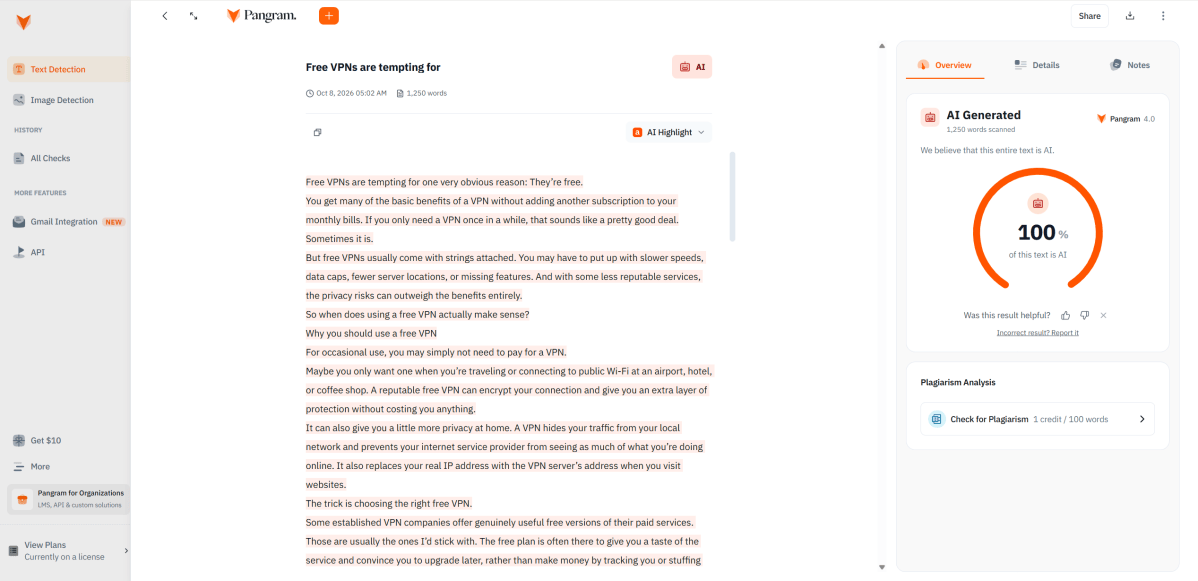
Pangram does very well with recognizing purely AI-generated texts. Here I asked ChatGPT to rewrite one of my articles, matching style, tone, and voice and humanizing it as much as possible. Pangram still recognized it as AI-text.
Sam Singleton
Pangram does an excellent job of detecting pure AI text. In fact, this was easily Pangram’s strongest showing. I tested 10 entirely AI-generated samples, from four major models, including ChatGPT, Claude, Gemini, and Grok. Pangram flagged every sample as 100 percent AI-generated, giving it a perfect detection rate for raw AI text in my test set.
That’s especially encouraging given that the samples came from four different AI models. Pangram wasn’t just catching the writing style of one particular chatbot—it successfully identified text from all of them.
It was also consistent. I scanned the same ChatGPT sample five times as part of my repeatability test, and Pangram returned the same 100 percent AI score every time.
Ten samples obviously aren’t enough to prove Pangram will catch every piece of AI-generated writing. But in this test, it couldn’t have done much better. If someone is copying text more or less directly from a major chatbot, it can be assumed that Pangram will reliably spot it.
Does Pangram mistake human writing for AI?
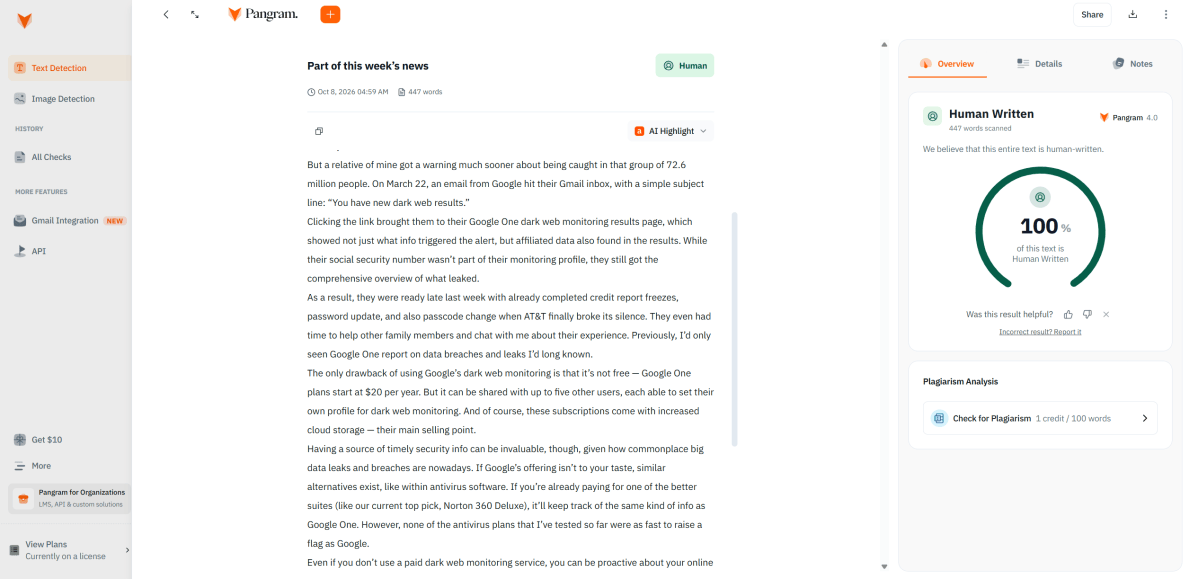
Pangram also correctly recognized human-written text in my tests with no false positive results.
Sam Singleton
Pangram did very well here as well. Again, I tested 10 entirely human-written samples and every one came back as 100 percent human and 0 percent AI. A zero percent false-positive rate for this test set is excellent.
Once more, the results were consistent, too. When I rescanned the human samples, Pangram always returned the same 0 percent AI score on every run.
That doesn’t mean Pangram will never produce a false positive. Factors such as writing style, length, topic, and language could all affect the results. But based on my tests, it appears that Pangram is unlikely to mistake human writing for AI.
Can editing AI text fool Pangram?
This is where things started to get iffy.
I tested five samples that began as AI-generated text and were then substantially edited by a human (myself). All of the finished versions were roughly 75 percent AI and 25 percent human. Pangram identified one as 100 percent AI (with no indication of human edits), but judged two to be 100 percent human. The other two were correctly identified as AI-generated with human edits.
So despite AI still making up the majority of those samples, Pangram caught only three out of five.
I also tested five mostly human-written samples that had been edited with AI, roughly 25 percent AI and 75 percent human. Pangram incorrectly classified three as 100 percent human-written, but classified the other two correctly as mostly human-written with some AI-generated sections.
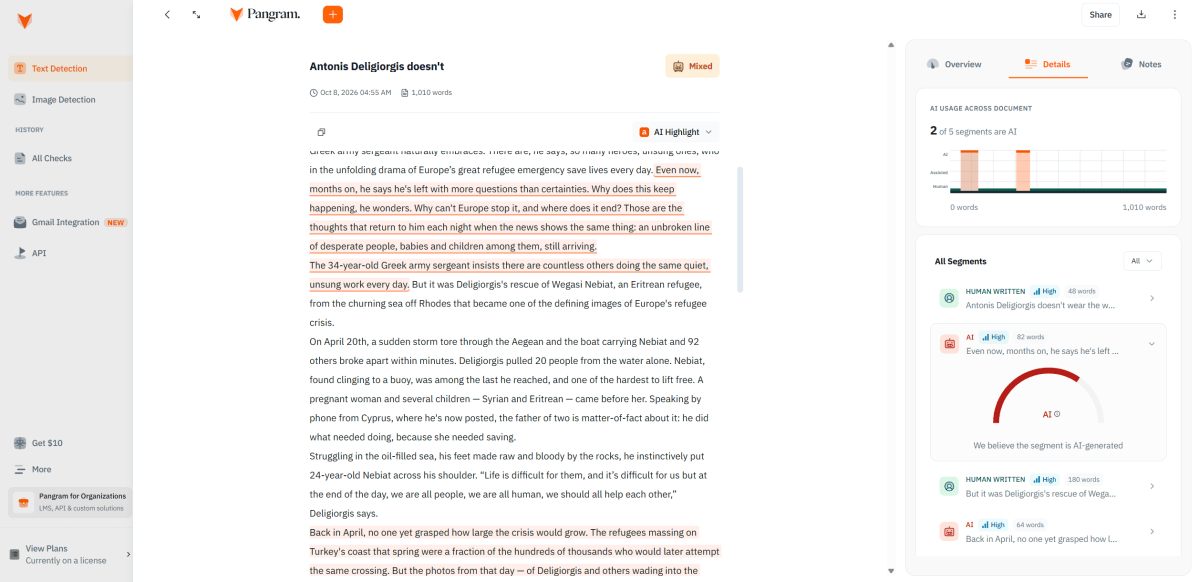
Pangram did struggle a little bit with mixed human- and AI-written texts. In this example, I substituted 30 percent of the text in the article with AI-generated text, and even though Pangram recognized most of it, the detector underestimated that 25 percent of the text was AI-generated instead.
Sam Singleton
Pangram was more successful with mixed AI- and human-written texts—those that have entire paragraphs or sections replaced with AI-generated text. It wasn’t perfect with its exact percentages of AI or human content—one was flagged as 75 percent human and 25 percent AI when it was actually 70 percent human and 30 percent AI. But it was dang near spot on at identifying the sections that had been replaced with AI writing.
These results aren’t necessarily a problem if you only care about who wrote the majority of a document. But if you’re trying to uncover any meaningful AI assistance, this could be a limitation.
Taken together, the results suggest that human editing can make AI-generated text much harder for Pangram to recognize. It handled untouched AI output exceptionally well, but once someone started rewriting sentences, rearranging ideas, and adjusting phrasing, Pangram started to have trouble.
Regardless, Pangram is not alone here. Most AI detectors still trip up when deciphering mixed human- and AI-written texts. It’s all a bit of a guessing game anyhow.
How does Pangram handle privacy and data?
Privacy is a big deal with AI detectors, and Pangram’s privacy and data handling policies are reassuring.
Scans you run in the dashboard are saved to your scan history, and they stay there as long as your account is active unless you delete them. Deleting a scan removes the text from Pangram’s servers, though the company keeps a record that the scan happened for billing and analytics. If you close your account, your data is then deleted within 30 days.
The most important point is that Pangram says it doesn’t train its detection models on what you submit. It says it relies on licensed and internally generated datasets instead. It also says it doesn’t sell your data or share it for advertising. Like most services, it uses outside providers, namely Amazon Web Services for hosting and Stripe for payments, and says they can only use the data they need to do their jobs.
Pangram says it complies with GDPR and other national and international privacy regulations. One thing to know for European users: The standard service stores data in the U.S., not the EEA.
Overall, Pangram’s privacy practices appear strong for an AI detector. I especially like the no-training promise and the ability to delete scans yourself. Still, I’d delete any sensitive document after scanning it just in case, unless you have a good reason to keep it in your history.
Is Pangram worth it?
Yes, absolutely. Pangram is a top-tier AI detector service based on my test results. It did remarkably well distinguishing between purely human-written and AI-generated texts. It struggled a bit on heavily edited texts, but that has always been par for the course with AI-detectors.
Even so, Pangram is polished and easy to use, with document uploads, scan history, plagiarism checking, and detailed highlighting. The $20-per-month Individual plan makes sense for frequent users, while casual users will likely be fine with the free tier. As with all detectors, it’s not 100 percent foolproof, but it works very well as a screening tool alongside human judgment.
Editor’s note: Because online services are often iterative, gaining new features and performance improvements over time, this review is subject to change in order to accurately reflect the current state of the service. Any changes to text or our final review verdict will be noted at the top of this article.
This articles is written by : Fady Askharoun Samy Askharoun
All Rights Reserved to Amznusa www.amznusa.com
Why Amznusa?
AMZNUSA is a dynamic website that focuses on three primary categories: Technology, e-commerce and cryptocurrency news. It provides users with the latest updates and insights into online retail trends and the rapidly evolving world of digital currencies, helping visitors stay informed about both markets.
