

At a glance
Expert’s Rating
Pros
- Incredibly versatile for both digital and analog recordings
- Long battery life
- Good transcription and summaries
- Several AI models to choose from
Cons
- The charging cable isn’t included as standard
- Doesn’t work with headphones, and can be tricky with certain Android handsets (phone calls)
- Expensive subscriptions
Our Verdict
Plaud Note Pro is a really smart and handy AI assistant that brings all your recordings — physical and digital — together in one place. Transcription and meeting summaries work well, and you can choose between different AI models, depending on which one best suits what you want to do with the recordings.
Price at time of review
This value will show the geolocated pricing text for product undefined
Best Pricing Today
Best Prices Today: Plaud Note Pro
There are plenty of AI services for transcription and meeting notes. What Plaud aims to do — and does very well — is to act as a hub for all your recordings and notes. Whether you’re recording in-person meetings and lectures, phone calls, or video meetings on your computer.
Everything is gathered in one place, and you can access and edit it anywhere, on both your mobile and your computer.
Sleek hardware
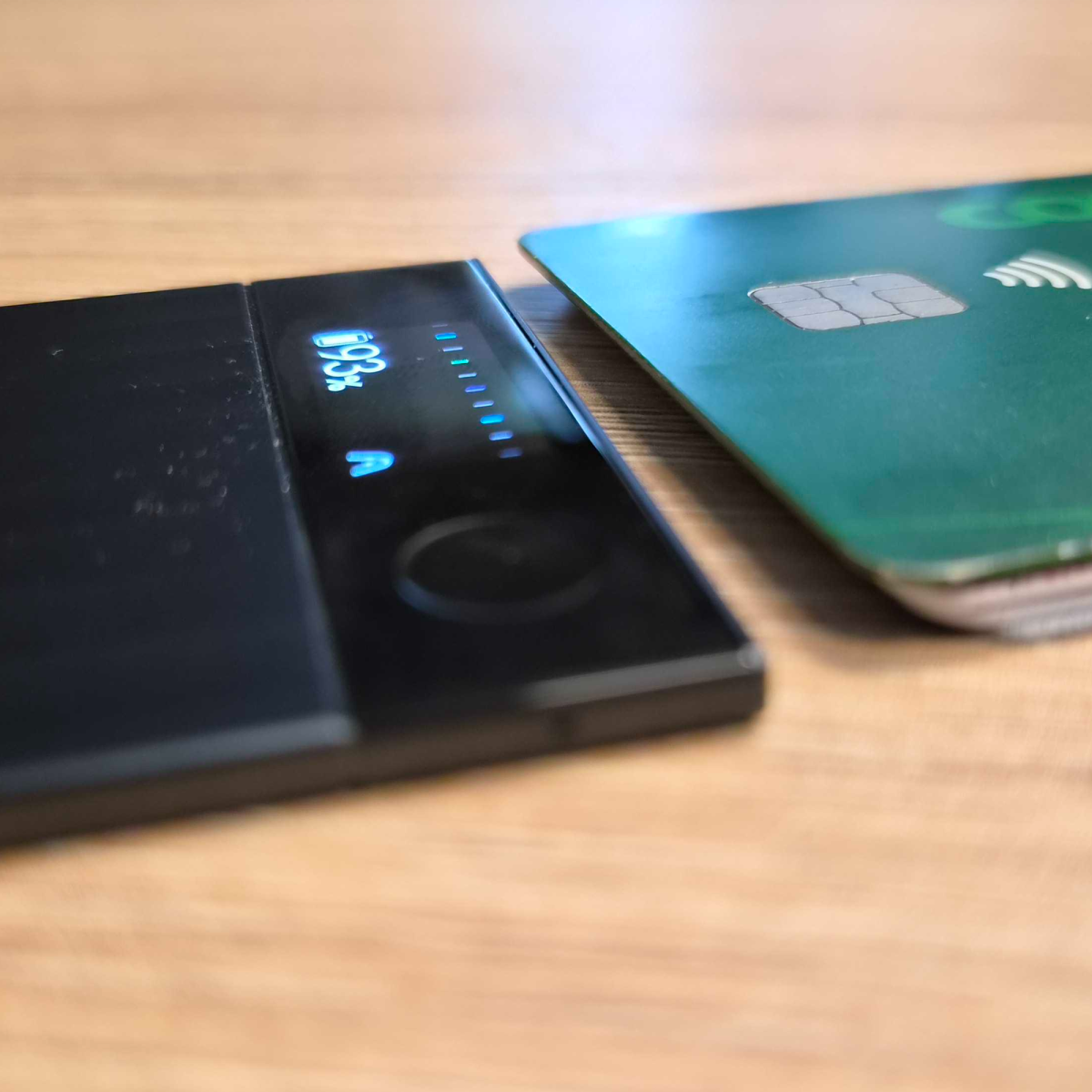
The Plaud Note Pro is essentially a very slim, credit-card-sized voice recorder weighing just a tad over 1 ounce (30 grams). My first thought when I take it out of the box is, “Oh, I’m going to lose this.” My second thought: “How on earth is this little thing going to manage to record meetings?” As it turns out, it does a very good job indeed.
M3 / Andreas Thors
The biggest visual difference from its predecessor, the Plaud Note, is that it now has a small display. That alone is a huge improvement, as you can now easily see when recordings start, the battery life and more.
They’ve managed to squeeze in four microphones, as well as a separate VPU (voice processing unit) that helps the microphones distinguish speech from distracting background noise. For example, it can amplify voices, reduce noise, and make the sound clearer before it’s saved or sent on for transcription.
The sound quality is perfectly acceptable, even in noisier environments, and it’s easy to hear everyone speaking. But it’s mainly the transcription that’s the point, so don’t expect podcast-quality recordings.
In “enhanced” mode, the range is up to 16 feet, which is fairly accurate, while “endurance” mode prioritizes battery life and reduces the range to 10 feet. The difference is 30 and 50 hours’ battery life respectively, so you don’t need to worry about missing anything if you want to record for a whole day, whichever mode you choose.
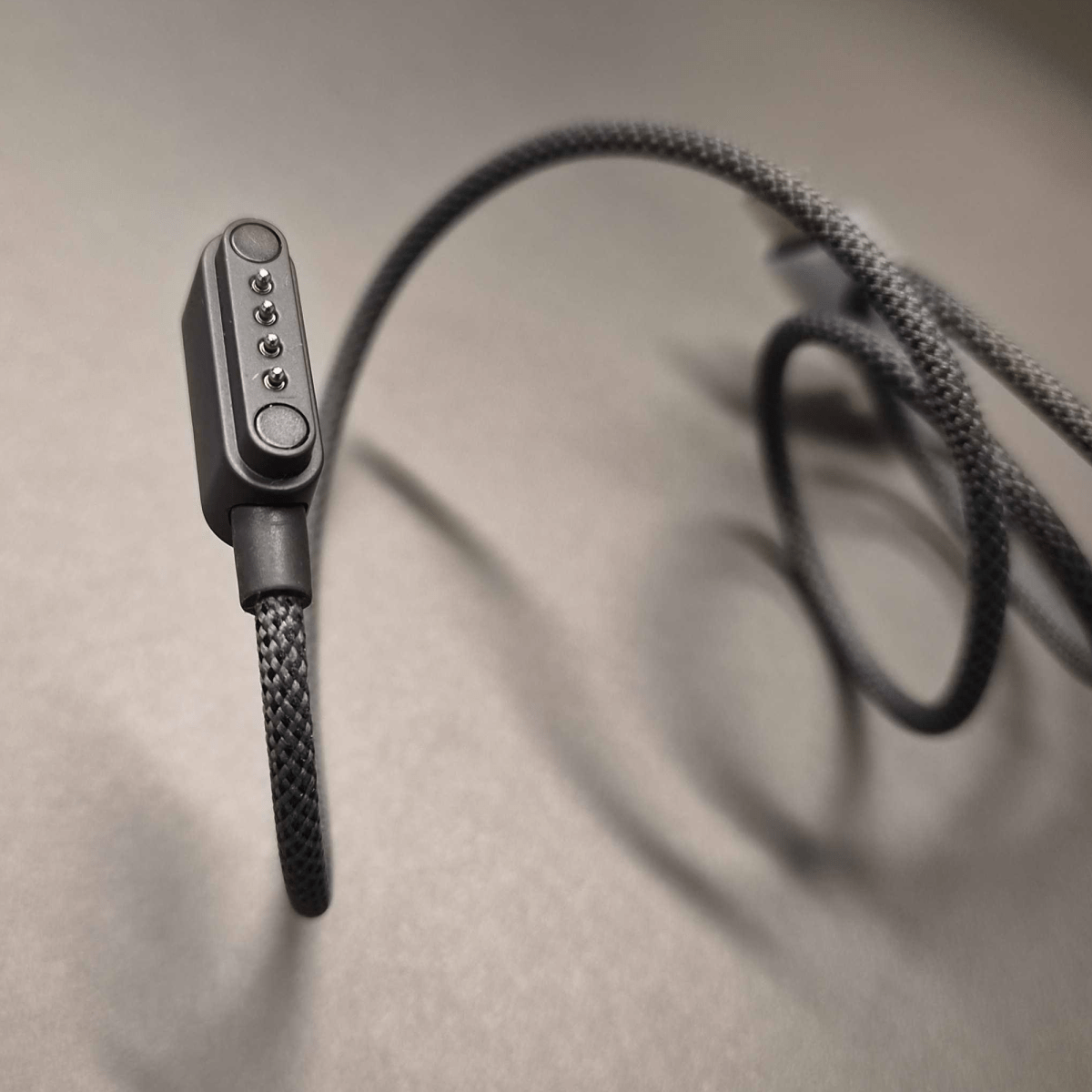
But that brings us to charging. This is the biggest compromise — and, depending on your preference, the biggest drawback of the whole recording device. The charging cable isn’t USB-C, but a specialized cable that attaches via magnets.
I can already picture myself tearing out my hair when I realize I’ve forgotten to pack it for a trip, or lost it and have to buy a new one.
Personally, I would have preferred a thicker voice recorder with USB-C, but if you record a lot of phone calls, the slim design is a definite advantage.
M3.se
Transcription and AI summaries
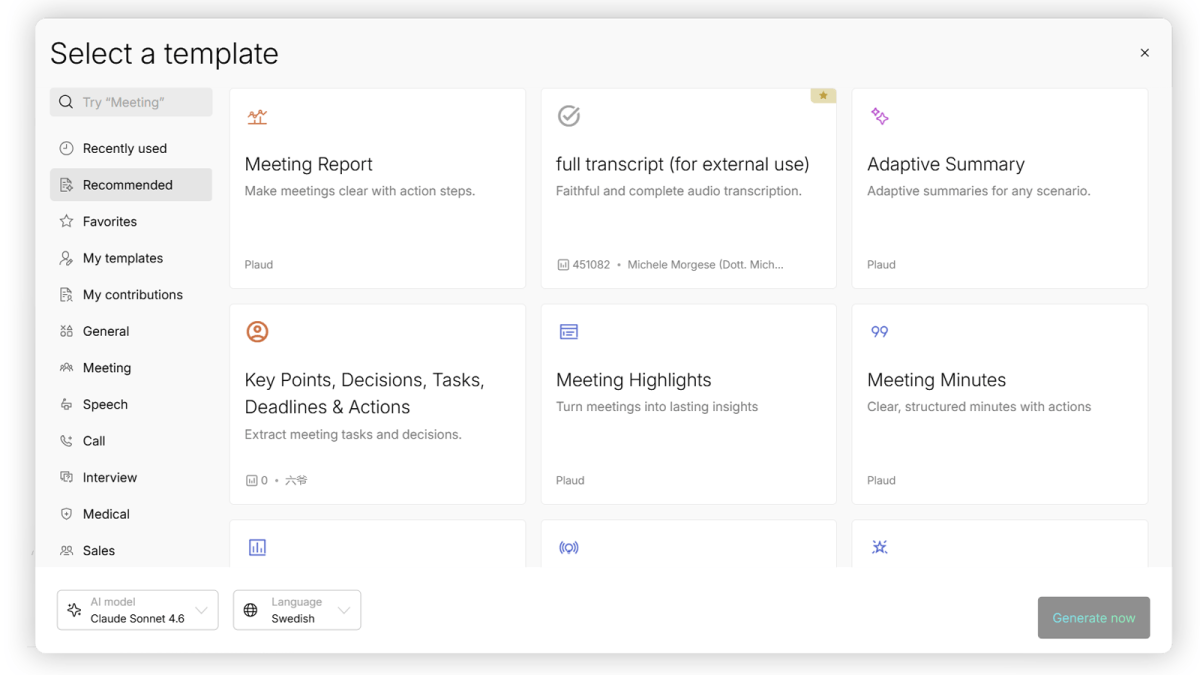
The recordings you make are synced with Plaud’s cloud solution (unfortunately, you can’t run the AI locally) and can then be transcribed and summarized in endless ways. Simply click “automatic transcription,” and Plaud then chooses which AI model to use, as well as the template and format for the summary.
If you want to fine-tune the process and customize it more specifically, you can make the choices yourself instead. You select which AI to use (at the time of writing, Claude, ChatGPT or Google Gemini) and then which format template to use. There’s a whole library of different templates created by Plaud and other users that you can use, or you can create your own template (i.e. your own prompt) for how the recording should be presented.
M3.se
In the finished transcript, you can then edit who said what, and it becomes very clear. You can also choose whether Plaud should remember this for future transcriptions, and it usually works.
A simple but handy feature is that you can easily share a link to your meeting summary so that the other participants can also access it.
The downside of using AI for transcriptions is, well, the AI itself. Although AI has come a long way, it is not flawless, and Plaud (and other transcription services) will never be better than the AI models on which they are based. AI services sometimes struggle with difficult words, slang, and specific industry jargon.
Areas of use
I tested Plaud in various scenarios to see how well it handles different environments and different numbers of people being recorded.
Four people around a table in the canteen
During lunch, much to my colleagues’ delight (well, sort of), I placed Plaud on the table and recorded our entire lunch conversation. It picked up all the different voices and could easily distinguish who was saying what. Soft background music and other people talking were no problem.
M3.se
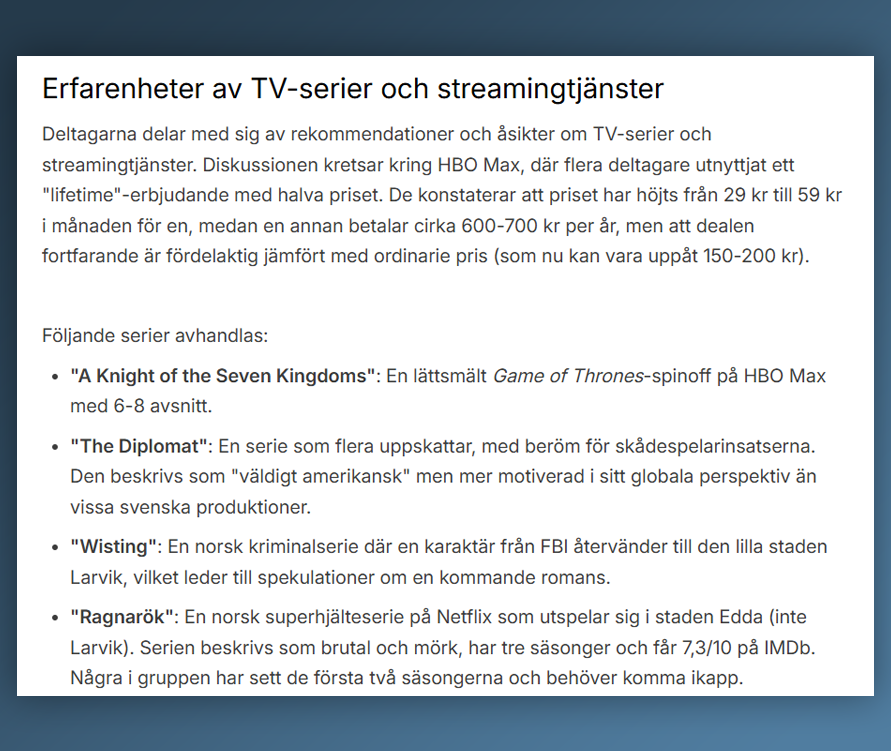
Afterwards, I received a clear summary of the topics we’d discussed, what we’d said, and what action should be taken (after-work plans, TV series to watch, and our general work-related gripes).
Recording phone calls
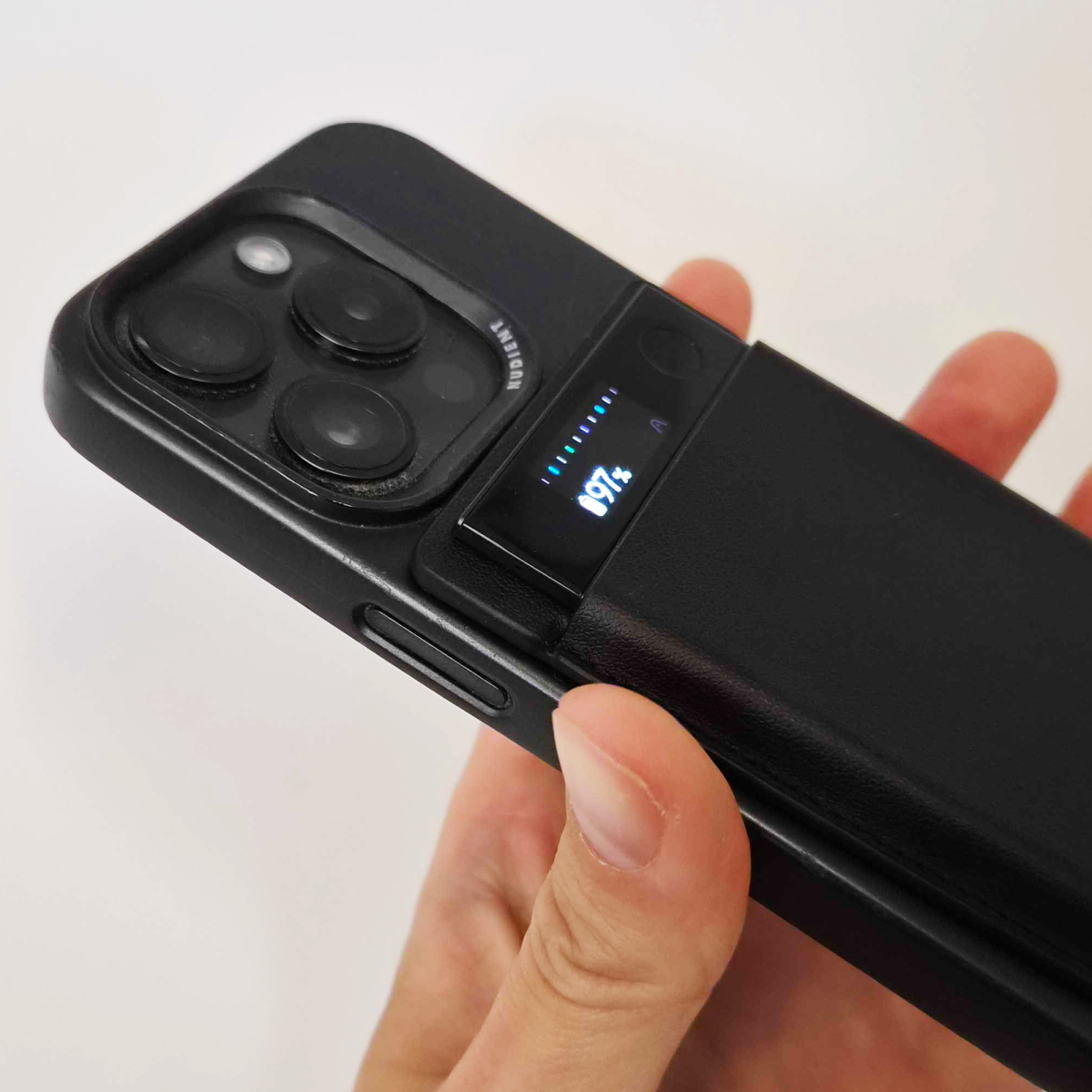
To record mobile phone calls, you attach the Plaud device to the back of your phone using the MagSafe-compatible mount. You can already tell that this is going to be trickier for those of you who don’t have an iPhone. However, it comes with a small magnetic ring that you can attach to your mobile or phone case if your phone doesn’t have a magnetic back.
M3.se
Recording calls is a bit like magic, as you don’t connect the Plaud via Bluetooth or any other method — you simply attach it to the back of your mobile and start recording. When it’s attached to the phone, it picks up the sound of the call through the phone’s vibrations, whilst simultaneously recording to its own storage. It automatically detects which recording mode is in use: phone calls or regular meetings and conversations in the room.
I tested it with both an iPhone and a Samsung Galaxy S26, and the results were really good. The only downside is that you can’t connect headphones.
Digital recordings
Personally, I’m completely sold on the digital side of Plaud, even though the hardware is also impressive. Perhaps mainly because I don’t have that many face-to-face meetings to record these days…
M3.se
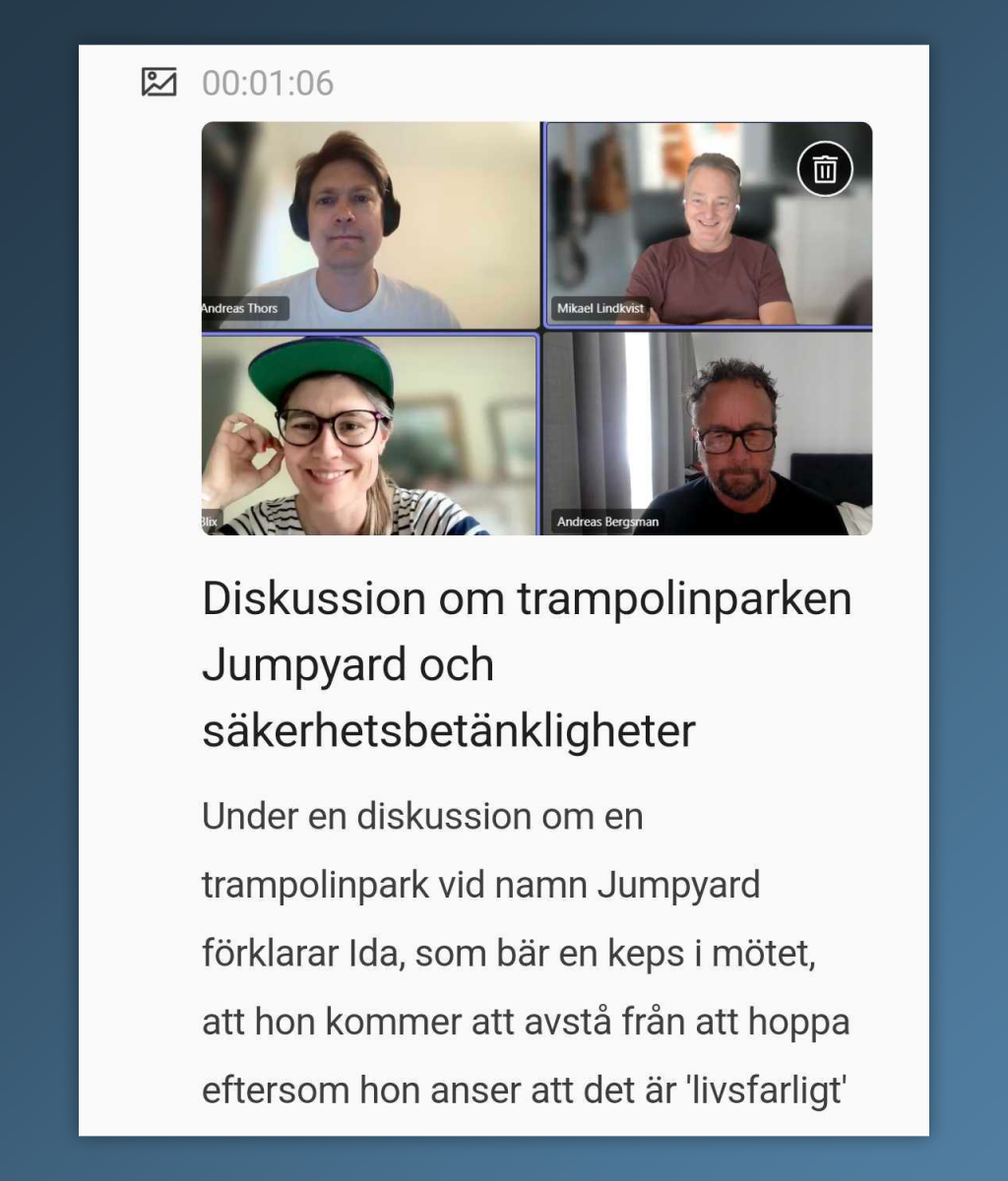
With an app on your computer, you can easily record meetings in Teams and other platforms. It all happens entirely in the background, so there’s no need to invite any annoying bots as meeting participants.
You can either set Plaud to start automatically every time you begin a meeting, or you can start it by opening the app.
The great thing about this is that you can add other elements while the meeting is in progress, such as screenshots or highlighting when something particularly important is said. This is then included in the meeting summary you receive once the meeting has been transcribed afterwards.
The meeting summaries are really good, and if you’re conducting interviews, you’ll save a lot of time.
Conclusion: Really good, but…
This is undeniably a very good AI assistant, but there are a few things to bear in mind before you take the plunge.
Foundry
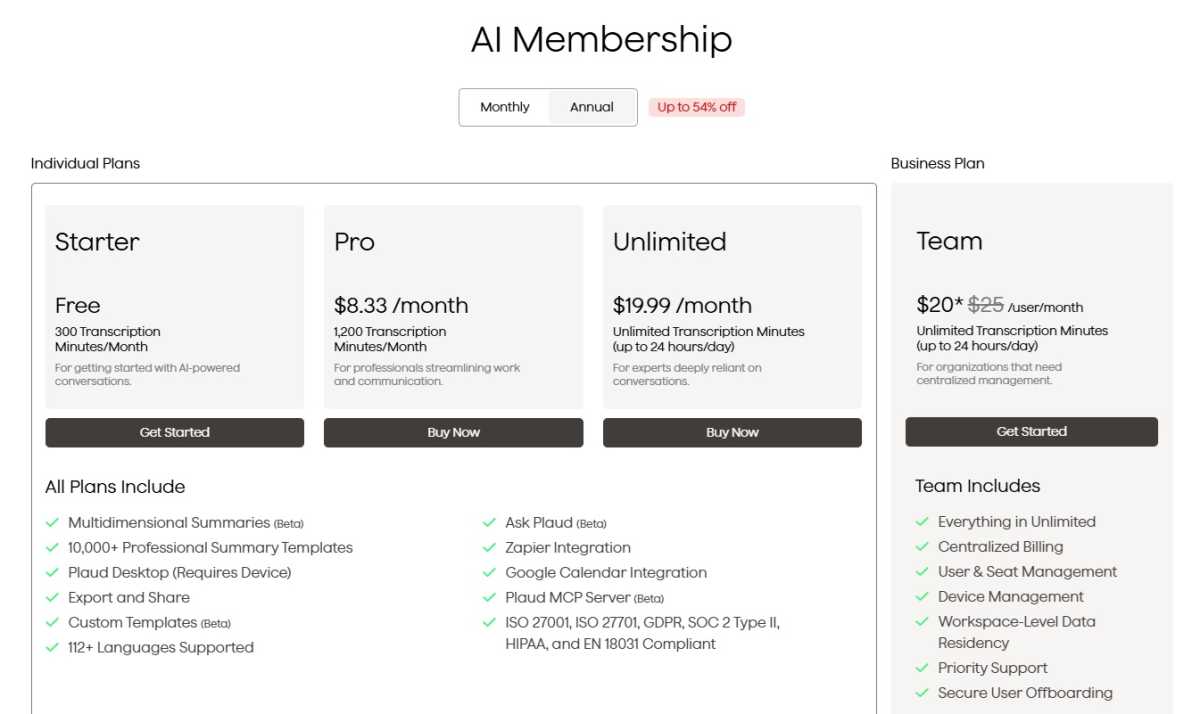
The first is the price. The Plaud device itself costs $189. If you use the service regularly, the 300 free minutes (per month) will run out quickly. You then have two subscription options to choose from: $99.99 per year (1,200 minutes per month) or $240 per year (“unlimited”).
You can also top up with X number of minutes at a fixed price. If you use Plaud for work or study, it may, of course, be worth the cost.
The second thing you need to ask yourself is: Do I need to record a lot of people in face-to-face meetings? If digital recording is enough, there’s a whole host of AI assistants to choose from, such as Google Notebook LM. What’s more, you can get a monthly subscription to one of the major AI services for almost the same price, and then you can use them for more than just transcription.
We’d definitely recommend the Plaud Note Pro, which makes note-taking a breeze, but with the caveat that you should consider the points above carefully before buying one.

Specifications
Tested: June 2026
Product: Plaud Note Pro
Type: AI recorder for meetings and phone calls
Screen: 0.95-inch AMOLED, 600 cd/m²
Glass: Corning Gorilla Glass
Microphones: Four MEMS microphones and one VPU microphone
Range: Up to 16 feet in Enhance mode, up to 10 feet in Endurance mode
Storage: 64GB
Recording time: Up to 30 hours in Enhance mode, up to 50 hours in Endurance mode
Standby time: Up to 60 days
Dimensions: 85.6 x 54.1 x 2.99 mm
Weight: 30g
Features: Fast file transfer via dedicated Wi-Fi network, automatic switching between calls and meetings, real-time highlighting, transcription, AI summaries, image support in the app, Apple Find My
Language support: Transcription in over 112 languages
Colours: Black, silver
Price: $189
Rating: 4.5 out of 5
This articles is written by : Fady Askharoun Samy Askharoun
All Rights Reserved to Amznusa www.amznusa.com
Why Amznusa?
AMZNUSA is a dynamic website that focuses on three primary categories: Technology, e-commerce and cryptocurrency news. It provides users with the latest updates and insights into online retail trends and the rapidly evolving world of digital currencies, helping visitors stay informed about both markets.
