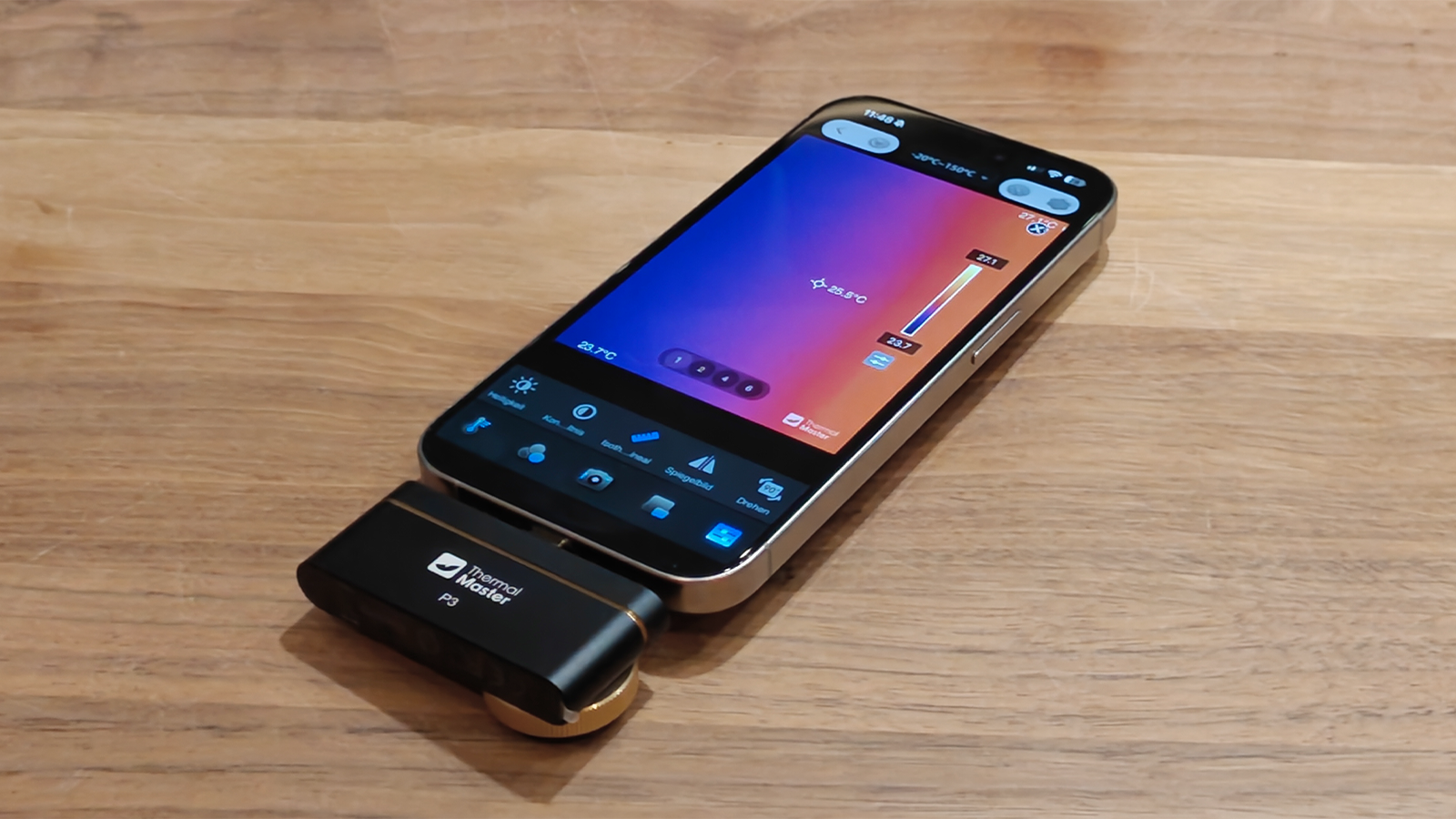

At a glance
Expert’s Rating
Pros
- Manual focus from a distance of 8 millimeters
- High thermal sensitivity of less than 35mK
- A well-finished aluminium housing weighing 27 grams
- Extensive range of accessories, including a carrying case
- USB-C port with Lightning and USB-A adapters
Cons
- No mounting option, no tripod thread
Our Verdict
At a street price of around $300, the P3 delivers high image quality for this price range. A standout feature is the manual focus, which proves its worth when shooting a wide variety of subjects. In our test, we used it to examine the heat distribution on a sauna heater, check for unusual heating during the installation of an Anker Solix solar panel in the cellar, and visualize the waste heat from mini PCs and projectors. The app looks a bit dated and, in places, is clearly machine-translated, but it runs smoothly. This makes the P3 a versatile, pocket-sized tool.
Price at time of review
This value will show the geolocated pricing text for product undefined
Best Price Today
Price When Reviewed
$299
Best Prices Today: Thermal Master P3

Thermal imaging cameras visualize temperature differences and help to detect heat build-up and potential thermal issues. In our day-to-day testing, we use them, for example, to examine the waste heat from laptops, mini PCs, and projectors. The Thermal Master P3 turns a smartphone into a compact thermography tool in just a few simple steps.
Compact design, but without a mount
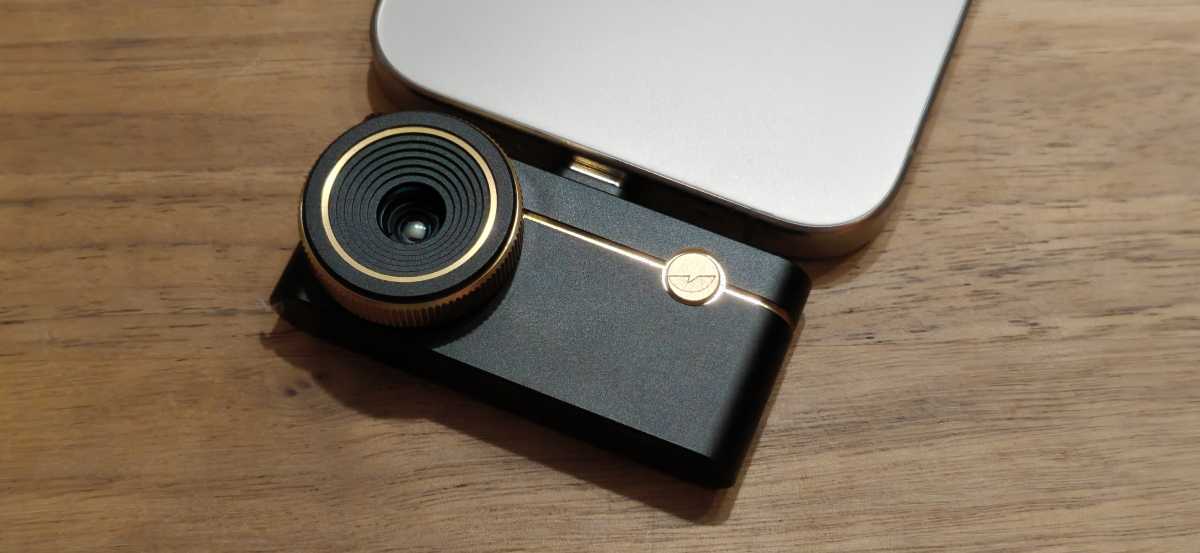
The P3 is barely any larger than a USB stick. The aluminum casing measures 2.32 × 1.06 × 0.67 inches and weighs about an ounce. The build quality feels premium; the focus ring offers a pleasant amount of resistance and can be rotated precisely. It is the only control on the casing; everything else is handled by the app.
There is no tripod socket. For longer series of measurements or images taken from a fixed position, you’ll have to use your free hand or an improvised mount. When working on open, live assemblies, the metal casing must not come into contact with circuit traces or component terminals.
Christoph Hoffmann
Thermal Master also offers the P3 in sets with an additional mount. As well as the standalone camera, there is a version with a smartphone mount, allowing the camera and mobile device to be combined into a more stable unit. Alternatively, a set with a 6D inspection stand is available. This is particularly useful for work on printed circuit boards and other stationary measurements where the camera and smartphone need to be positioned as steadily and reproducibly as possible. The sets do not alter the technical specifications of the P3.
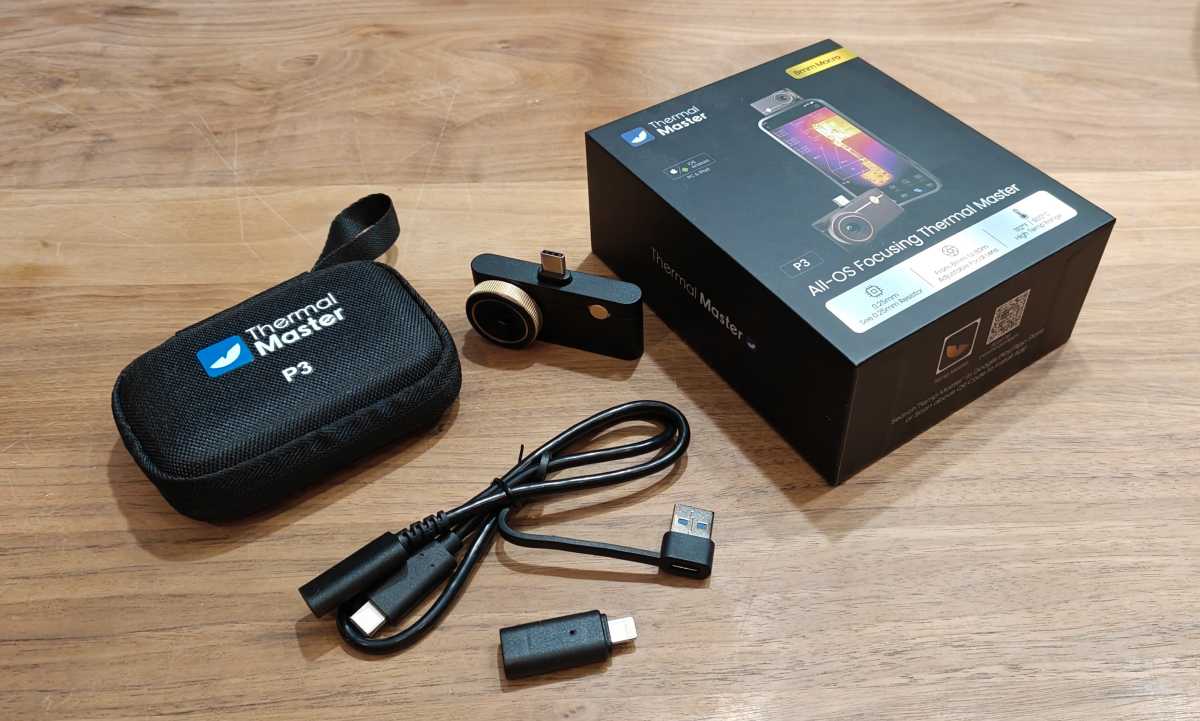
The package includes an extension cable, a Lightning adapter for older iPhones, a USB-A adapter, and a sturdy carrying case. The printed manual explains the measurement functions clearly.
Ready for immediate use with a smartphone
The P3 can be connected directly to a smartphone. For devices with a USB-C port, the camera is simply plugged into the port. An appropriate adapter is included for older iPhones with a Lightning connector. There’s no need to pair it via Bluetooth or Wi-Fi. Once you’ve launched the Temp Master app and granted the necessary permissions, the live feed appears straight away. We used an iPhone 15 Pro as our test device. The setup works in exactly the same way with an Android smartphone.
Christoph Hoffmann
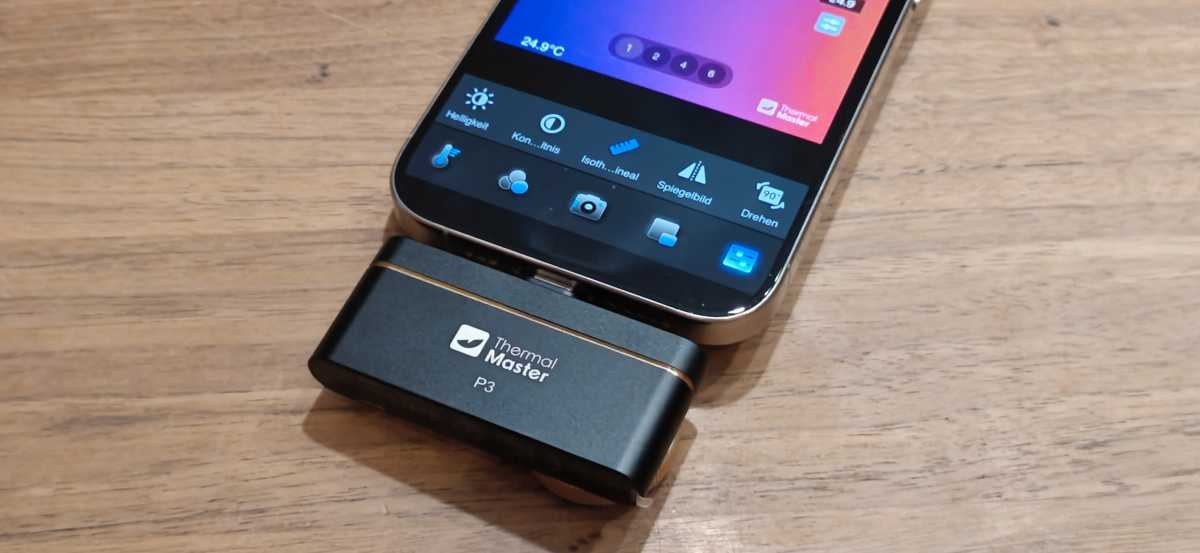
Two things stand out during use. First, the module protrudes horizontally from beneath the smartphone and puts mechanical strain on the USB-C port when taking photos overhead. Secondly, the camera occupies the USB-C port, meaning the smartphone cannot be charged via that port whilst the camera is in use.
Christoph Hoffmann
If you’re using a thick protective case, the plug may not click into place fully. A short extension cable is included to address this. Power consumption is negligible during use and places only a minimal strain on the smartphone’s battery, even with prolonged use.
Manual focus makes all the difference
Almost all clip-on cameras in this price range feature a fixed lens, including the Thermal Master P2. The P3 is fitted with a lens with a 4.3-millimeter focal length and a rotatable focus ring. The manufacturer specifies a focus range of 8 millimeters to 80 meters.
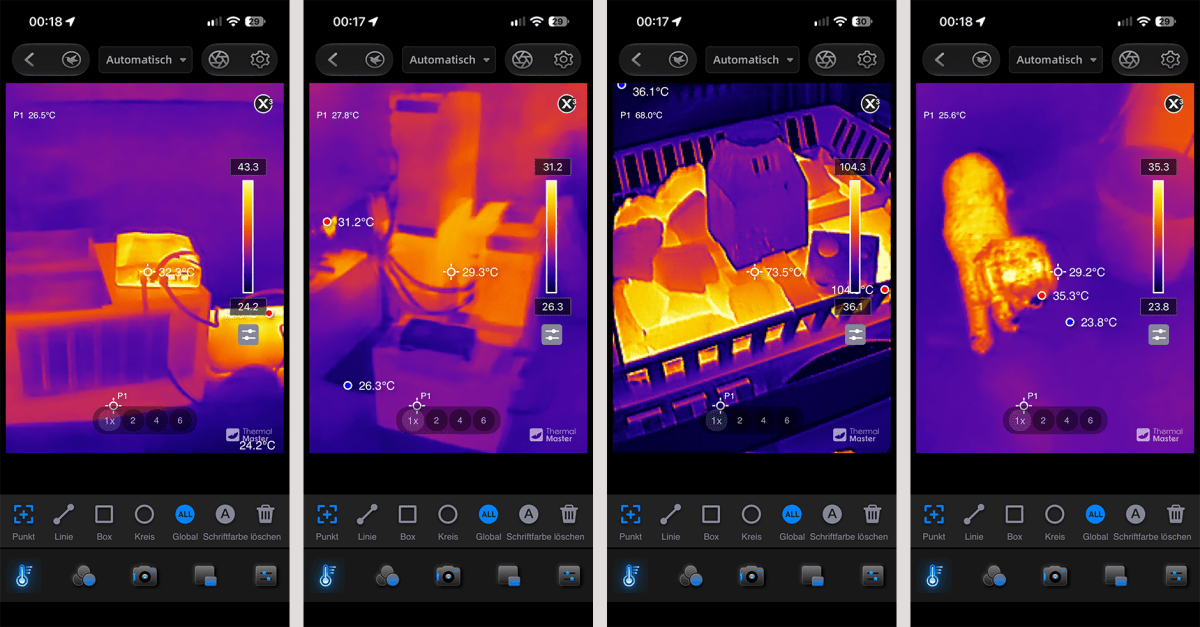
In practice, manual focus proves its worth on a wide variety of devices. With mini PCs and laptops, for example, heatsinks, voltage converters, and other heated components can be examined in detail from close range. With the GMKtec NucBox K13, for instance, we used the P3 to analyze the heat distribution within the compact chassis.
Christoph Hoffmann
When testing the JMGO N3 Ultimate, we again used the P3 to monitor the projector’s heat dissipation. The camera recorded temperatures of around 40 degrees Celsius at the rear ventilation slots. Such measurements demonstrate the practical benefits of the P3: Heat build-up and noticeable temperature differences can be quickly located and documented.
The resolution is also sufficient for larger subjects: Among other things, we checked the heat distribution on a sauna heater and inspected the installation of several Anker Solix solar panels in the cellar for any noticeable hotspots. The manual focus via the dial helps to bring both small details at close range and larger areas into sharp focus.
It was also possible to visualize the layout of underfloor heating. With our test subjects, the discernible level of detail decreased significantly beyond around 20 meters. At that point, manual focus can no longer compensate for the limited sensor resolution.
Image quality and measurement values
The VOx sensor has a native resolution of 256×192 pixels with a pixel size of 12 micrometers. In X³ mode, the software upscales the thermal image to 512×384 pixels. The result appears more detailed and with sharper contours for static subjects. However, interpolation does not produce any additional sensor detail.
In live view, the display responds slightly more sluggishly when X³ is activated; edges become blurred during panning. The mode is worthwhile for static shots, but less so for quick scans while on the move. The app saves images at a resolution of 1440×1880 pixels.
Thermal Master specifies the thermal sensitivity as less than 35 millikelvin (mK) at 25 degrees. This means the camera can display temperature differences of less than 0.035 degrees Celsius. The frame rate is 25Hz.
Both of these characteristics are evident in practical use: Subtle temperature differences are clearly visible, and the live image runs smoothly. The measurement range extends from minus 20 to 600 degrees and is divided into a standard and a high-temperature setting.
According to the data sheet, the accuracy is plus/minus 2 degrees or 2 percent of the measured value. In our test, random comparative measurements using a contact thermometer showed deviations of less than 1.5 degrees on matte surfaces.
On bare metal surfaces, reflections significantly distort the readings. This is a fundamental limitation of non-contact infrared measurements. Emissivity, measurement distance, and ambient temperature can be adjusted in the app.
Thermal Master app: Lots of features, but not yet fully developed
The iOS version of the free app that we tested offers extensive functions for capturing, analyzing, and documenting thermal images. There are 12 color palettes to choose from. Indoors, “Iron Red” has proved to be well-balanced, while “Rainbow” offers better orientation across wide temperature ranges. The digital zoom allows the image to be enlarged up to 15 times.
For temperature measurements, individual measurement points as well as lines and areas are available. In addition, alarms can be set for when temperatures exceed or fall below specified values. An isotherm mode highlights defined temperature ranges in color. For more accurate measurements, the emissivity, measurement distance, and ambient temperature can be adjusted. This is particularly important when dealing with different materials, as their emissivity can vary significantly.
In the mode referred to by Thermal Master as “Picture-in-Picture,” the thermal image can be superimposed over the iPhone camera’s view with adjustable transparency. The app records videos at 25 frames per second, including audio. This allows spoken comments to be recorded during a measurement. X³ mode upscales the thermal image to 512×384 pixels, providing a slightly sharper outline for static subjects.
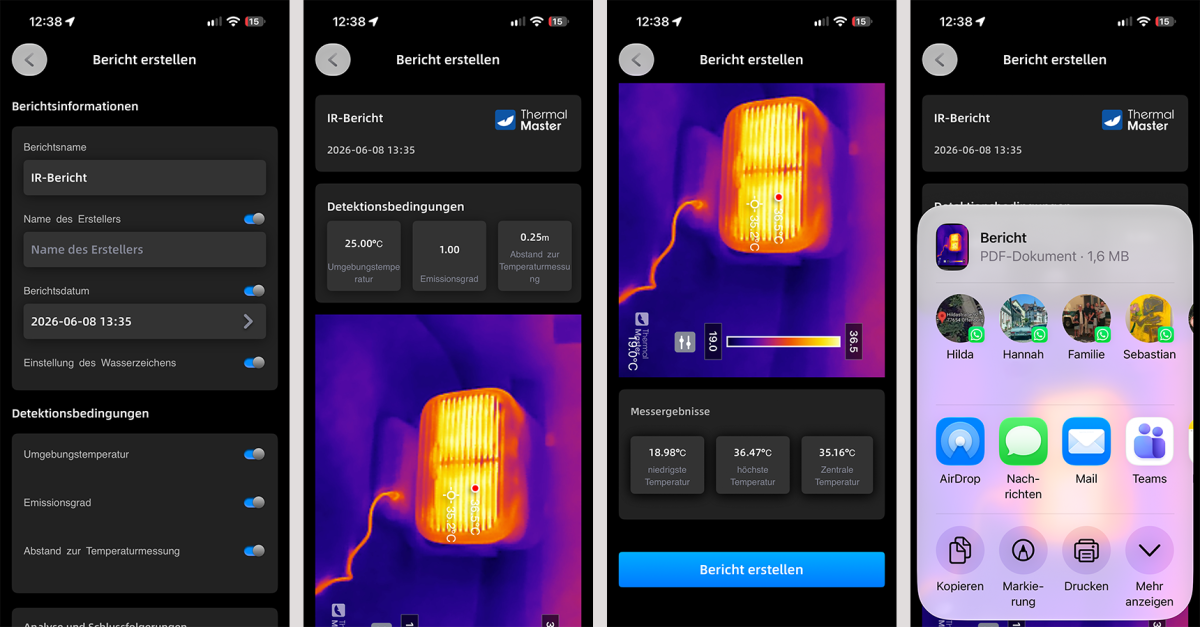
Saved thermal images are stored in a gallery sorted by date and can then be reused. The integrated reporting function is particularly useful. For an IR report, details such as the report name, creator, and date can be entered. In addition, the app records measurement conditions such as ambient temperature, emissivity, and measurement distance. The thermal image is included in the report alongside the minimum, maximum, and center temperatures. A watermark can also be activated.
Christoph Hoffmann
After previewing, the app generates a PDF document directly on the iPhone. This can be shared via the iOS sharing function — for example, by email or AirDrop — opened in other apps or printed. Individual thermal images can also be exported as JPEGs. This makes the P3 suitable for documented measurements during maintenance, electrical, or building inspections. However, we were unable to find an option to export the measurement data as a CSV file.
The software is not entirely without its flaws. The interface looks, in places, as though it were from an earlier generation of Android; some menu items appear to have been machine-translated, and the operating logic is not always self-explanatory. This is partly reflected in user reviews, which mention, among other things, display issues, crashes, or difficulties with screen rotation. In our test with the iPhone 15 Pro, however, the Thermal Master app ran smoothly. There were no crashes or connection drops.
Should you buy the Thermal Master P3?
The Thermal Master P3 impressed in our test with good image quality and high thermal sensitivity. It stands out from many budget smartphone thermal imaging cameras thanks to its manual focus. This makes it suitable for close-up shots of circuit boards as well as for detecting thermal anomalies and potential thermal bridges in buildings.
On suitable surfaces, the readings are accurate. It is straightforward to use. Weaknesses include the outdated app, which features some clunky translations, and the lack of a mounting option.
Technical specifications
- Sensor: VOx microbolometer, 256×192 pixels, 12µm pixel size
- Image optimisation: X³ IR to 512×384 pixels, RazorX algorithm
- Thermal sensitivity (NETD): less than 35mK at 25 °C
- Frame rate: 25Hz
- Field of view: 40×30.2 degrees, focal length 4.3mm
- Focus: manual, 8mm to 80m
- Measuring range: -20 to 600 °C
- Measurement accuracy: ±2 °C or ±2 percent
- Digital zoom: 15x
- Power consumption: 0.32 watts
- Connection: USB-C (Lightning and USB-A adaptors included)
- Compatibility: iOS, Android 7.0 and above, Windows 10/11
- Dimensions and weight: 59 × 27 × 17.2 mm, 27 g
- Price: Around $300 retail
This articles is written by : Fady Askharoun Samy Askharoun
All Rights Reserved to Amznusa www.amznusa.com
Why Amznusa?
AMZNUSA is a dynamic website that focuses on three primary categories: Technology, e-commerce and cryptocurrency news. It provides users with the latest updates and insights into online retail trends and the rapidly evolving world of digital currencies, helping visitors stay informed about both markets.
